Portfolio
Selected work
A small selection of work we're able to show publicly — further case studies and enterprise projects are available on request under NDA.
 autodetailing-deki.pro
Auto Detailing Đeki – From Website to Digital Service Platform
A multilingual platform for vehicle detailing – from price calculation through booking to transparent order tracking, managed from a central back office.
Auto Detailing Đeki: Digital Service Platform for Car Detailing
30.09.2026
Overview
Auto Detailing Đeki is a multilingual web platform for a professional car detailing studio, with a clear focus on the Croatian market and deliberately built-in growth potential in neighbouring countries.
The platform was designed so that local market requirements, regional customer expectations and a later cross-border expansion do not have to be treated as separate projects.
The project combines a public website with detailed service descriptions, vehicle-dependent pricing logic, configurable packages, appointment booking, payment options, customer reviews, vehicle documentation, job tracking and a dedicated administration interface.
The goal was not to build yet another detailing website with a contact form.
The goal was to bring the Customer Journey and day-to-day business processes together in one maintainable system.
A visitor should be able to understand which services are offered, follow the differences between variants, see real work results, put together the right scope of service and book an appointment.
The business, in turn, should be able to manage the processes behind it without having to change source code.
From the outset, the technical and content structure was set up with Croatia as the primary market, while multilingual support and central content management can support a stronger position in Slovenia, Hungary, Austria and other neighbouring markets.
Technologies used include:
State-of-the-art web technologies • Responsive design • PayPal integration • Google Gemini API
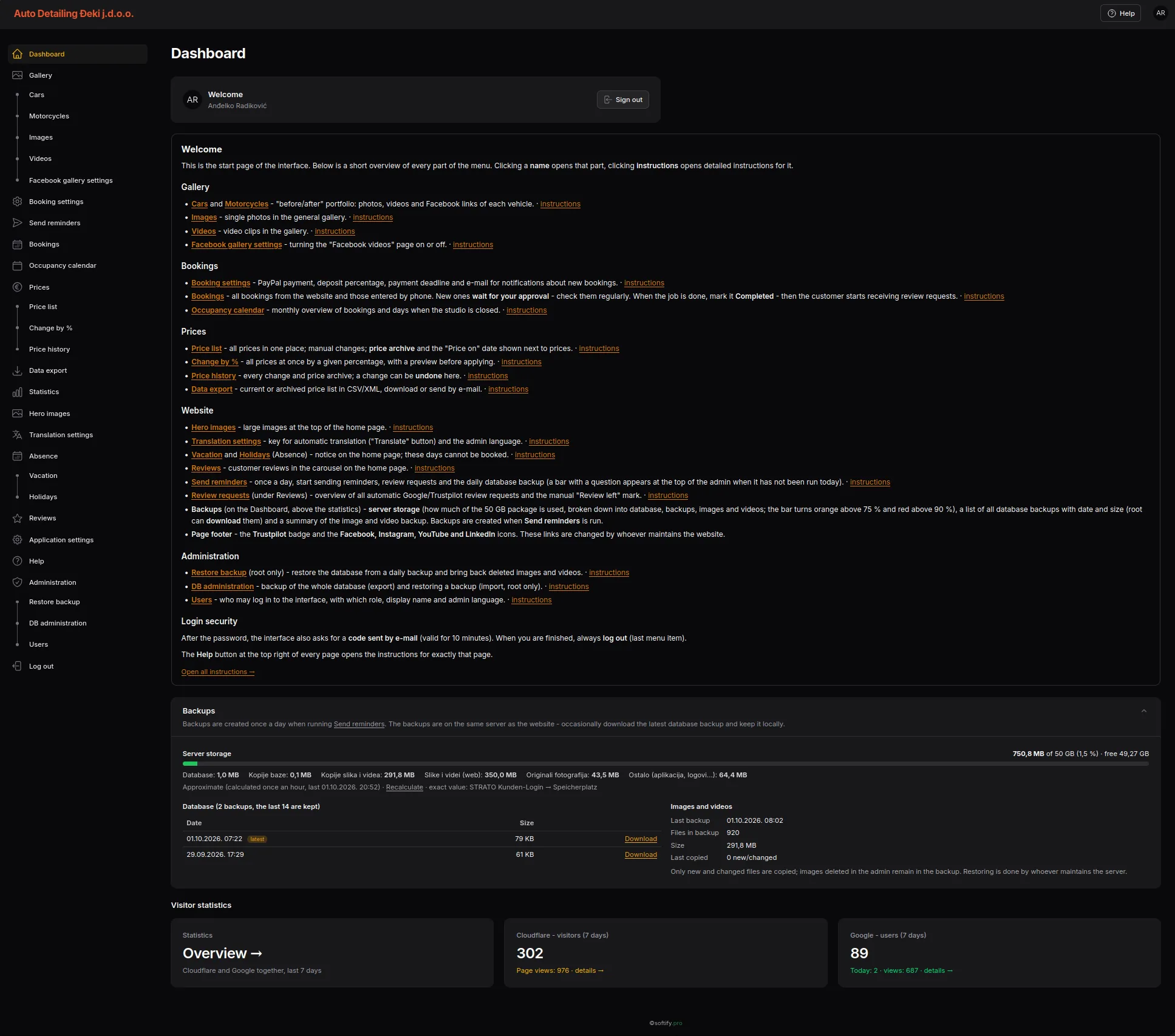
A central back office for bookings, prices, content, translations, availability, media and operational administration.
The administration interface alone shows the real scope of the project.
Behind the public website there is no isolated booking form, but an application in which the essential business processes come together.
The challenge
Professional car detailing is hard to reduce to a simple price list.
The actual scope of work depends on several factors:
- vehicle category
- condition of the vehicle
- required polishing stage
- chosen detailing package
- type of paint coating
- additional services
- required working time
- studio availability
A customer may know that their car needs polishing.
But they do not necessarily know the difference between a single-stage and a multi-stage paint correction.
The same applies to ceramic coatings.
Durability, gloss, chemical resistance, hydrophobic properties and warranty differ from product to product.
A static website can list these differences.
But it struggles to connect them to a real booking and the operational processes behind it.
The challenge was therefore to make a complex service understandable without requiring the customer to become a detailing specialist.
Understand first. Then book.
The public website deliberately starts before the actual booking process.
Visitors can find detailed information on interior detailing, exterior detailing, polishing, paint decontamination, ceramic coating and maintenance.
The detailing process is presented in four phases:
Inspection → Preparation → Correction → Protection
Each phase is explained separately.
It describes not only what is done, but also why this step is necessary.
Interior detailing, for example, covers not only the cleaning itself but also optional protective treatments for leather, fabric and plastic.
For the exterior, the content goes deeper into topics such as paint correction, chemical and mechanical decontamination, ceramic paint protection, headlight restoration and engine bay cleaning.
The idea behind it is simple:
The customer should understand what they are buying before being asked to book it.
Ceramic protection as a decision — not a checkbox
With ceramic coatings, a product name alone is not enough.
The platform therefore includes a direct comparison of different Gtechniq protection systems.
The comparison covers, among other things:
- durability
- slickness
- gloss
- wash resistance
- water and dirt repellency
- chemical resistance
- UV resistance
Higher-end variants get their own detail pages.
They are not positioned merely through a higher price.
For Crystal Serum Ultra, for example, the layer build-up, scratch resistance, chemical resistance, temperature and UV resistance, professional application and warranty period are explained.
The software does not decide for the customer.
It gives them the information they need to make an informed decision.
Packages, vehicle categories and configurable services
The same scope of service does not require the same effort on every vehicle.
The pricing structure therefore distinguishes between vehicle categories such as:
Small car • Mid-size • SUV
Within these categories, predefined packages are available:
Basic package • Standard package • Premium package
In addition, the customer can configure the desired service in more detail.
The booking process can combine:
- vehicle category
- package
- polishing stage
- paint protection
- additional services
The selection is shown immediately in a summary.
The total price results from the chosen configuration.
The flow thus becomes a clear process:
Vehicle → Package → Polishing → Paint protection → Extras → Date → Customer details → Booking
For the customer, it remains a clear selection.
In the background, it remains consistent business logic.
Prices as part of the business logic
Prices are not scattered across individual pages as hard-coded text.
They are managed centrally in the administration.
Different prices can be maintained for packages, polishing stages, paint protection, additional services and vehicle categories.
This means the publicly displayed price and the price used for the booking come from the same pricing structure.
In addition, the administration supports global percentage price changes.
A general increase or reduction therefore does not have to be carried out manually, item by item.
Changes are documented in a price history and can be reverted if needed.
A price change thus becomes a traceable business transaction instead of a silent overwrite of a value.
Availability from two perspectives
Scheduling is based on a shared view of actual capacity utilisation.
The occupancy calendar is available both to the operator in the administration and to the customer during the booking process – each in a form suited to the respective task.
The operator gets an operational monthly overview of occupied periods, bookings and blocked days.
Different states show which bookings are still awaiting confirmation, which are already confirmed or completed, and which periods are blocked by company holidays or public holidays.
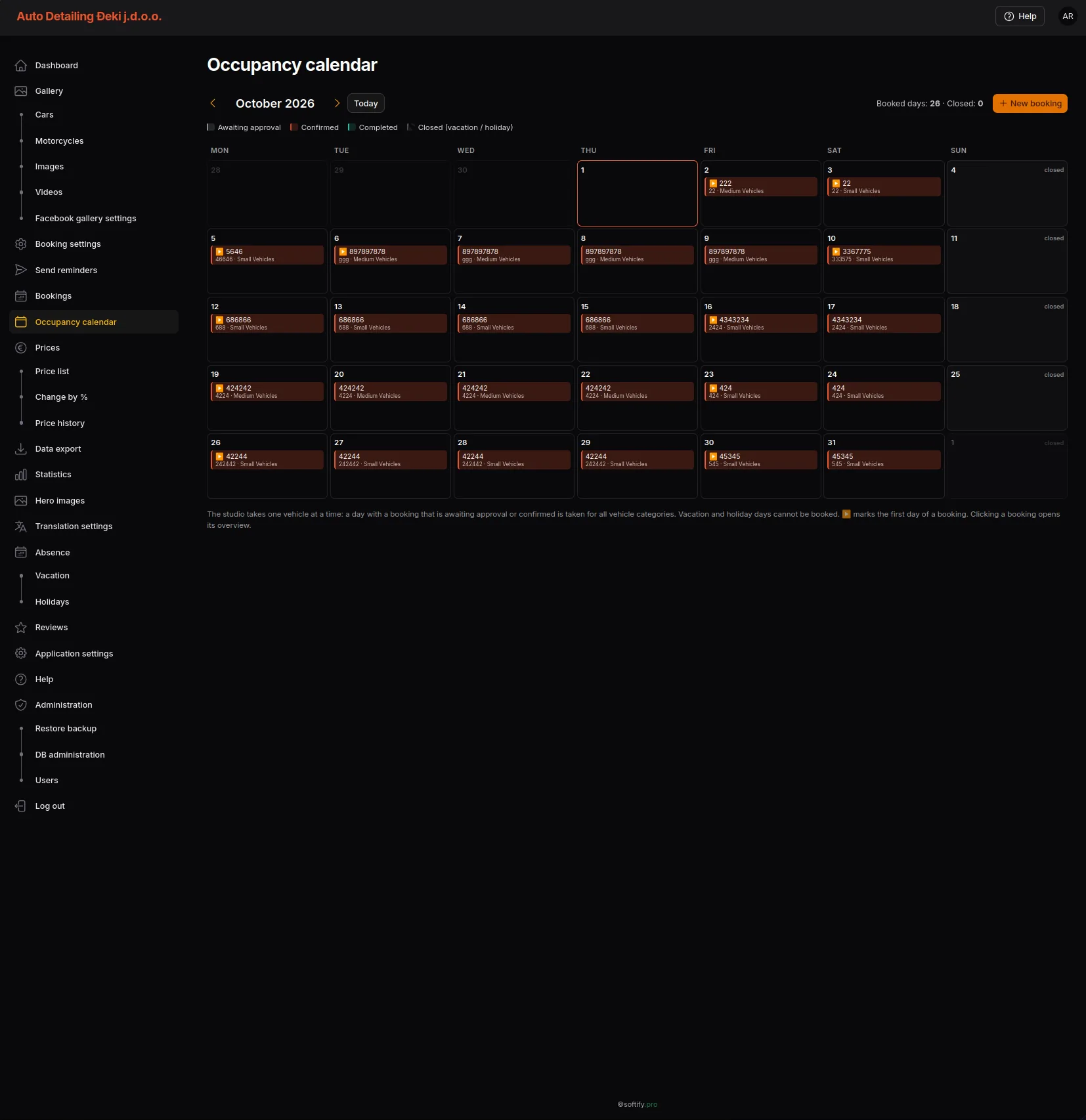 Shared availability logic connects internal capacity planning with the customer's choice of date.
The customer sees the same operational reality from a simplified perspective.
Periods that are already occupied or blocked are not available for a new booking.
At the same time, the application determines the next possible date and suggests it directly.
The suggestion remains flexible.
The customer can still choose another available date.
As a result, there are no two separate calendars.
There is one shared availability logic with two different views:
Operator: plan and control.
Customer: see and choose available dates.
This is particularly relevant for detailing services, because depending on the vehicle, package and scope, a job can take several working days.
The application therefore has to find not just a free day, but a free period that is long enough.
The system knows the workload.
The operator controls it.
The customer sees what is actually available.
A booking becomes a business process
A booking does not just generate an email.
It becomes a manageable case within the administration.
A booking contains, among other things:
- chosen package
- vehicle category
- start and end
- price
- payment method
- payment status
- booking status
Bookings can be reviewed, confirmed, edited or declined.
Payments can be marked accordingly.
Appointments arranged by phone can also be entered manually.
This way, bookings remain part of the same system regardless of their origin.
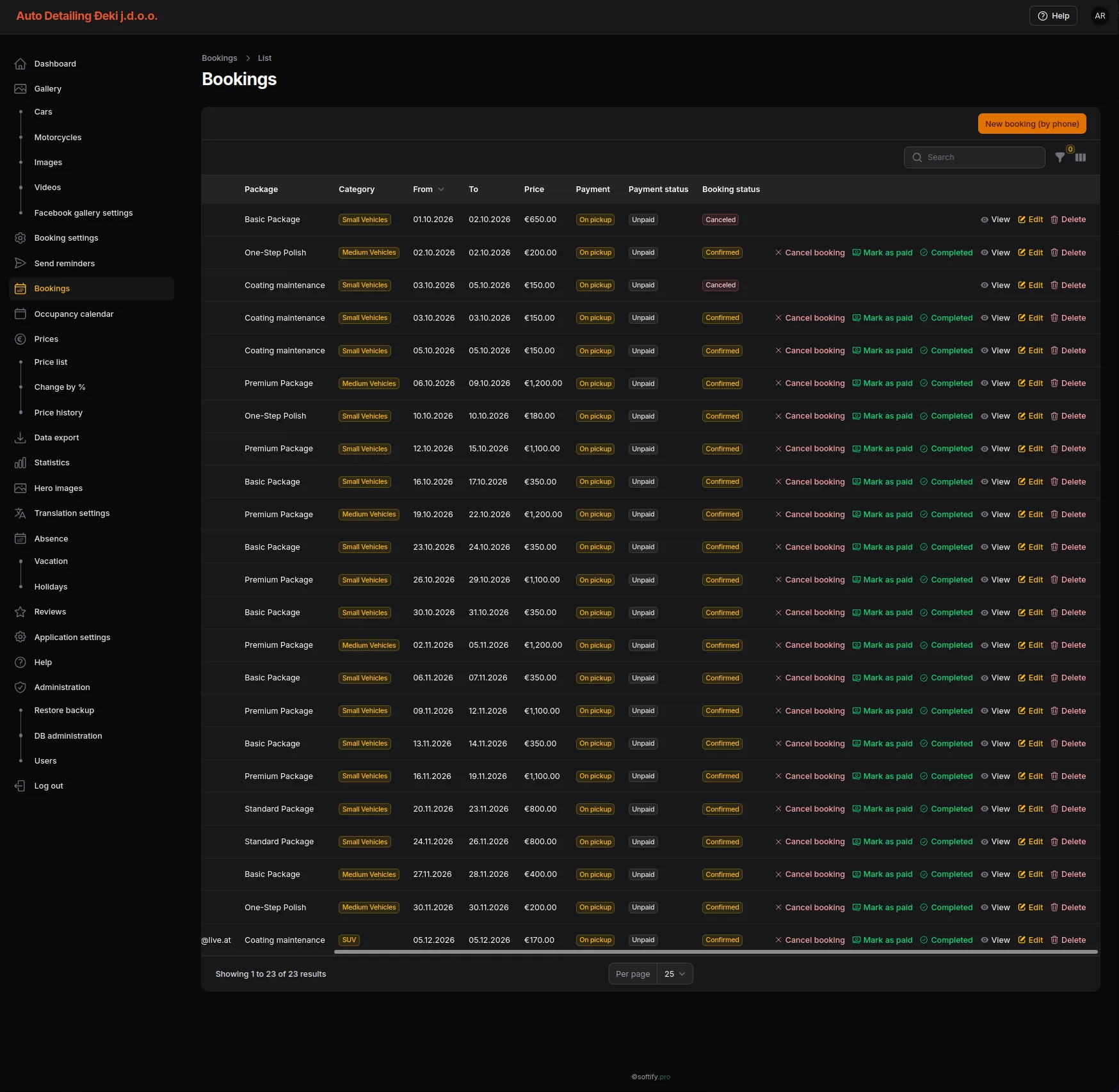 From receipt to operational handling, the booking remains part of the same business process.
A booking remains a business object – regardless of whether it was created online or by phone.
Deposits and payment settings
Payment rules are configured within the administration.
The business can, for example, define:
- whether PayPal deposits are offered
- how high the deposit is
- how long a payment deadline applies
- where notifications are sent
- whether the integration runs in sandbox or live mode
In addition, the platform is prepared for a further payment integration via PayWay / PBZ Card.
The booking application remains responsible for the booking and its status.
The payment provider remains responsible for the actual payment transaction.
This separation keeps payment logic where it belongs without interrupting the Customer Journey.
Multilingualism as part of the system
Auto Detailing Đeki is aimed primarily at the Croatian market.
At the same time, the business is located in a geographical setting where customer relationships do not necessarily end at the national border.
The platform therefore supports:
Hrvatski • Slovenščina • Magyar • Deutsch • English
Croatian is the primary market language.
At the same time, Slovenian, Hungarian, German and English lay the foundation for addressing neighbouring markets and international customers without building a separate technical platform for each country.
Multilingual support is not limited to the main menu.
Service descriptions, navigation, calls to action and operational content are available in each language context.
The architecture thus supports both today's positioning in Croatia and a possible regional expansion.
AI-assisted translation
Some operational content changes more often than other content.
Company holidays or public holiday notices are typical examples.
Creating these texts manually in several languages every time would generate unnecessary work.
That is why the administration includes an optional integration with Google Gemini.
A Croatian source text can be translated into the other supported languages directly from the administration interface.
The generated texts remain visible and editable.
The AI takes over the repetitive part.
Responsibility for the published content remains with the business.
When the studio is closed, the website knows it too
Availability does not depend only on existing bookings.
Company holidays, public holidays and other periods of absence also affect when new jobs can be accepted.
Dedicated administration modules exist for this.
An entry can contain, among other things:
- start
- end
- season
- multilingual message
- optional background graphic
Once the defined period has expired, a temporary notice does not have to be removed manually.
The public website thus follows the actual operational situation.
At the same time, such blocked periods also feed into the availability logic.
Information and planning thus remain consistent.
Reviews and real work
Customer reviews are integrated directly into the public website and can be maintained within the administration.
In addition to the review text, the name, date, an optional Google link and the business's reply can be stored, among other things.
Completed vehicles are also treated as structured content.
Cars and motorcycles can get their own gallery entries with photos, videos, external Facebook links and before/after views.
A comparison slider lets visitors view the results directly.
The gallery is therefore not merely decorative content.
It becomes visible proof of work actually carried out.
From appointment to transparent job tracking
The digital Customer Journey does not end with the booking.
The customer receives a QR code that leads to their personal job tracking area.
Via this link, the progress of the work on the vehicle can be viewed at any time.
The operator updates the process status within the application.
As soon as a new relevant status is entered, the customer is also informed by email. However, the email is not a prerequisite for seeing the current status.
The customer can open their personal link at any time and check for themselves how far the work has progressed.
They do not have to wait for the next message.
This creates a continuous flow of information:
Booking → personal QR code → work status → update → email notification
The customer does not have to call to ask.
The operator does not have to explain the same status repeatedly across several communication channels.
Both sides access the same case – each from their own perspective.
Find my vehicle
In addition, the customer can access the vehicle area intended for them via “Find my vehicle”.
The necessary access information is sent by email.
After entering the personal code, the information released for this case becomes visible.
This area is not freely accessible to the public.
Customer-related documentation thus remains clearly separated from the public vehicle gallery.
The public gallery shows deliberately published work. The personal area, by contrast, connects a specific customer with their job and their vehicle.
In this way, an appointment booking turns into a digitally supported service process:
Book → Work → Inform → Track → Document
Linking bookings and vehicle documentation
Within the administration, a vehicle can be linked to a specific booking.
This creates a direct connection between the operational case and the later documentation.
The booking describes which work was planned.
The vehicle entry documents the treated vehicle and the associated content.
Individual images can be released for the public gallery or hidden separately.
Videos and external links can be added independently of this.
The result is not simply one large media folder.
It is structured documentation built around a real vehicle and a specific job.
One central administration interface
The administration brings the daily business processes together within one application.
It can be used to manage, among other things:
- bookings
- booking settings
- occupancy calendar
- prices
- price history
- homepage content
- translation settings
- company holidays
- public holidays
- reviews
- car galleries
- motorcycle galleries
- photos
- videos
- Facebook gallery
- database
- users
The goal is not to provide as many admin pages as possible.
The goal is not to spread related processes across several independent tools.
Contextual help right in the workflow
Administration software becomes second nature with daily use.
Especially at the beginning, however, a user should not have to search through a separate manual to understand a function.
That is why the administration has contextual help.
The application takes into account the administration area currently open and provides matching information directly within the working interface.
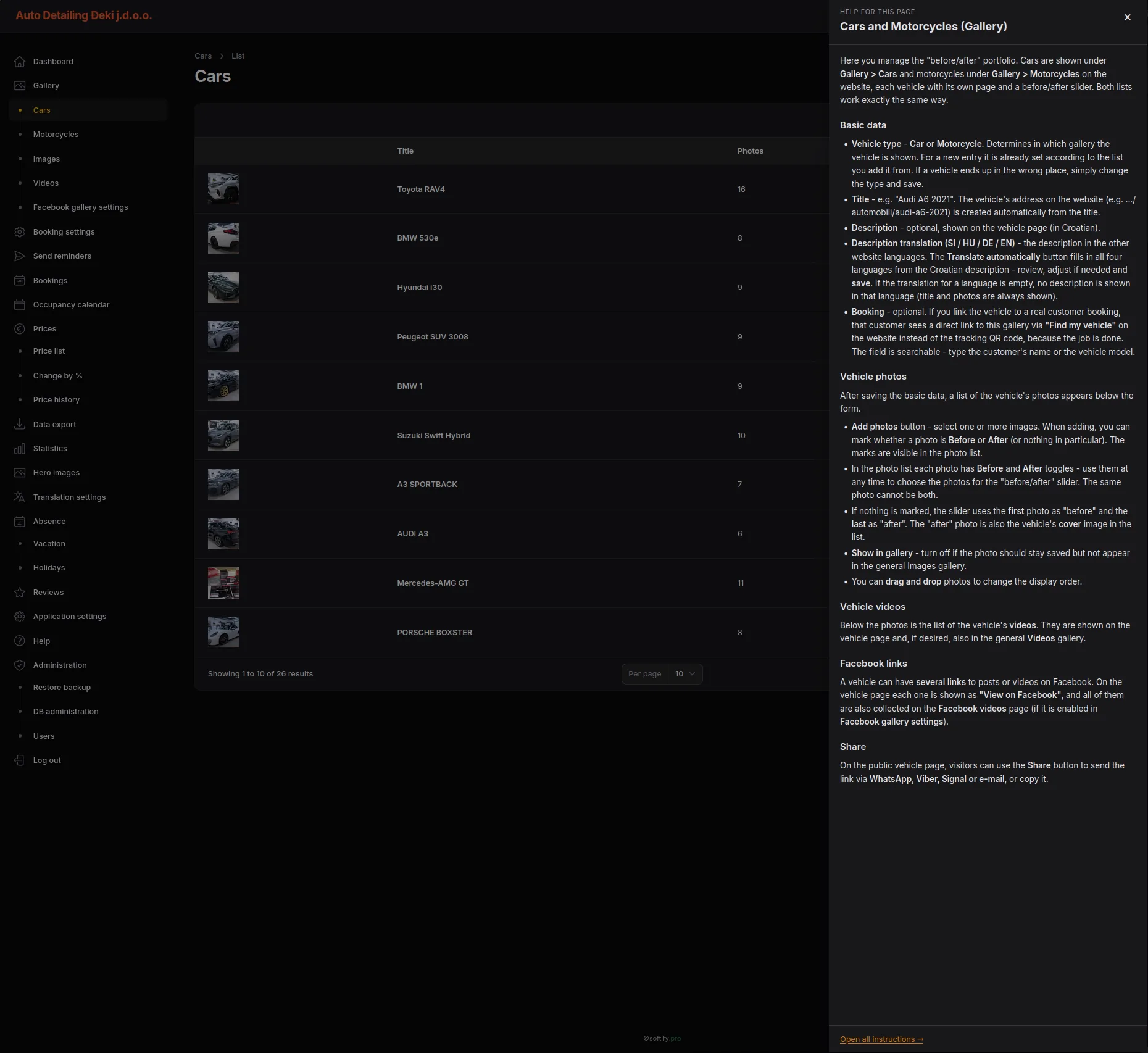 The documentation follows the current working context – not the other way round.
In the company holidays area, for example, it explains how an entry is created, how multilingual messages work, when a notice becomes active and how several entries are handled at the same time.
The user thus receives exactly the information that belongs to the current step.
They do not need to know in which chapter of an external manual the function in question is described.
The help follows the working context.
Not the other way round.
Documentation thus becomes part of the application rather than a separate file that has to be maintained independently of the actual system.
Quality not only after go-live
A platform that connects bookings, prices, multilingual content, customer communication, availability and operational administration has to do more than just work visually.
During development, functional flows and different user paths were therefore checked repeatedly.
In the development and quality assurance process at softify.pro, COCO was used alongside classic manual testing as a supporting testing and verification instance.
The focus included consistent navigation, form flows, language switching, pricing and booking logic, calendar and availability logic, and the connection between the public website and the administration area.
COCO did not replace functional acceptance.
It complemented it.
Repeatable user flows could be checked systematically, while the final assessment remained with humans.
Especially in an application with several languages, numerous administration areas and interconnected business objects, an additional verification path reduces the risk that a change in one place unintentionally affects other processes.
Database backup, restore and user permissions
Operational data must not exist in only one place.
The administration therefore offers controlled export and import functions for the database.
Before an imported database replaces the existing one, a backup of the current state is created and the imported file is checked.
Access rights are also managed within the system.
Users can have different roles, so routine tasks do not automatically require the same permissions as critical administrative operations.
Public website and back office
The customer does not need to understand the administration system.
But the administrator should not have to transfer the same customer booking manually into a second system either.
This very boundary shapes the project.
The public side focuses on:
Understand → Compare → Configure → Book → Track
The internal side focuses on:
Confirm → Plan → Price → Work → Inform → Document
Both sides work on the same business process.
Engineering Principle
The project follows a principle that also runs through other custom business applications by softify.pro:
Complexity belongs behind the interaction.
A customer should not have to calculate which combination of vehicle category, polishing stage, coating and additional service results in the right price.
They should be able to choose what they need and see the result.
They should not have to figure out for themselves when the studio has capacity again.
The system should show them what is actually available.
And they should not have to call to find out how far the work on their vehicle has progressed.
This information should be available where the customer expects it.
Likewise, the operator should not have to edit source code to change prices, enter company holidays, manage bookings or publish vehicle images.
The software should carry this complexity.
Not the customer.
Not the operator.
This approach follows the development principle of softify.pro: complex business logic should be mastered internally, while the interaction remains clear and comprehensible for customers and operators.
Result
Auto Detailing Đeki became more than a showcase website for the Croatian market.
The platform combines local market positioning with a technical foundation that is already prepared for regional reach.
Multilingual content, centrally managed business logic and a shared back office make it possible to address additional target groups in neighbouring countries without having to rebuild the application.
At the same time, the platform combines service information, structured pricing, configurable detailing packages, appointment booking, shared availability logic, payment rules, reviews, customer-specific job tracking and vehicle documentation within one custom web application.
For customers, this creates a clear path from the first piece of information through selection and booking to transparent tracking of the ongoing job.
They see which dates are actually available.
They receive a suggested next date.
They can follow the progress of the work themselves at any time via their personal link.
New relevant process updates are additionally communicated by email.
Through “Find my vehicle”, customer-specific access to released vehicle information remains clearly separated from the public area.
For the business, at the same time, a central operational environment emerges for bookings, prices, capacity, availability, content, communication and the documentation of completed work.
The administration controls the processes in the background.
The customer sees the result.
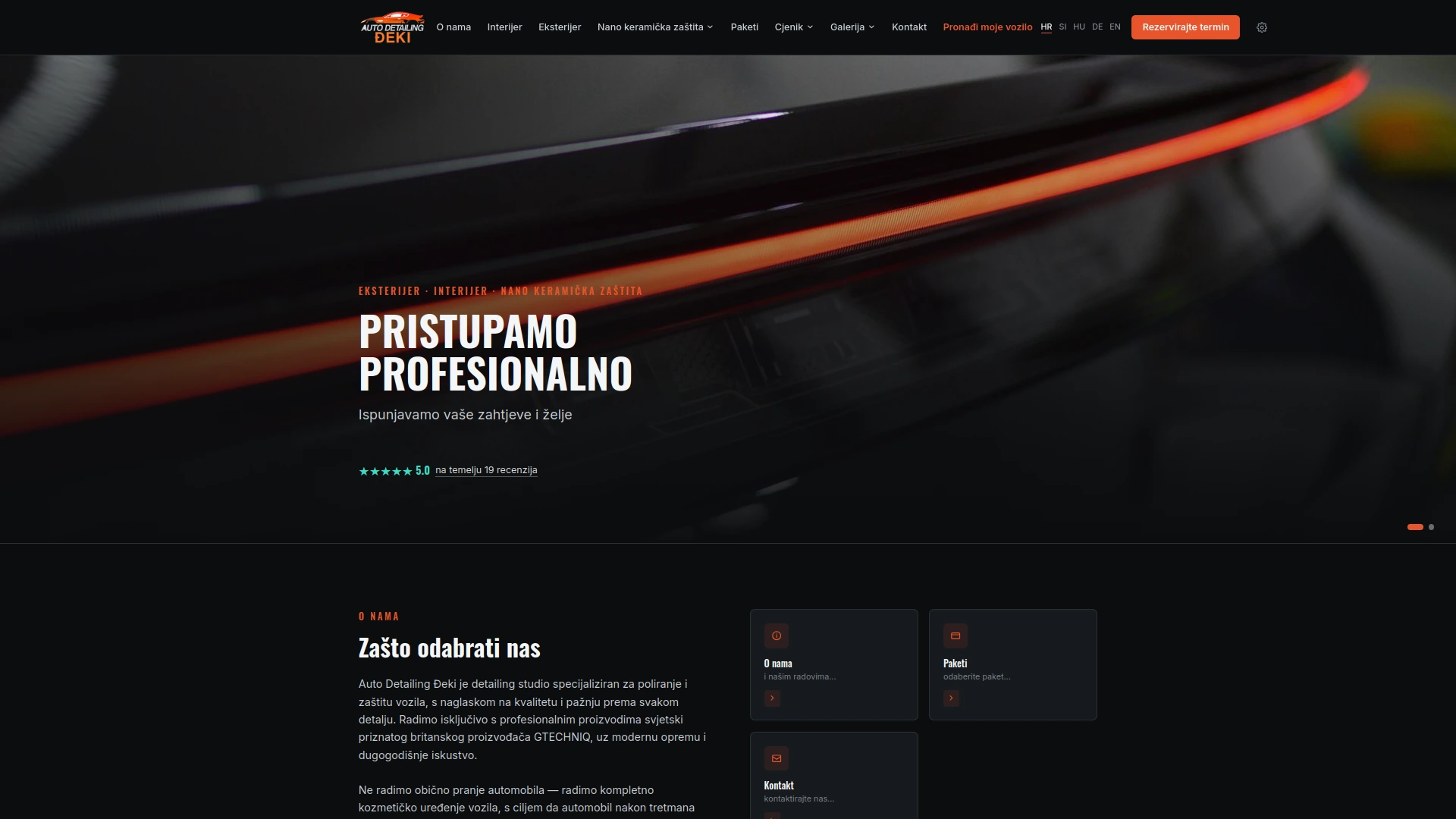
The public interface is the visible part of a far more comprehensive digital business process.
Fittingly for detailing, the same holds true here:
The real complexity lies in the work.
The software makes sure it stays manageable.

Koralpenhaus
Regional presentation and booking website in the Alpine region, built with a focus on clean structure, fast loading and easy content maintenance.
Koralpenhaus.eu - Hospitality, booking and content management in one System
17.08.2026
Overview
Koralpenhaus.eu is a multilingual web platform for an Alpine accommodation business in Carinthia, Austria.
The project combines the public website with room presentation, availability, pricing, reservations, online deposit payments and customer self-service.
The goal was not to add a booking form to a website.
It was to create one maintainable system in which the public content and the booking process work together — while keeping the experience simple for guests.
Technology stack we used, among others:
PHP • MySQL • JavaScript • Responsive Web • PayPal Integration
The Challenge
Accommodation websites look simple from the outside. The underlying process usually is not.
A guest needs to find a suitable room, select a period, understand the applicable price, check whether enough capacity is available, provide the required information, create a reservation and complete the required payment.
Several rules have to remain consistent throughout that process:
- room capacity
- arrival and departure dates
- existing reservations
- guest categories
- member and non-member pricing
- booking totals
- deposit amounts
- payment state
- reservation validity
The challenge was to handle those rules without transferring their complexity to the guest.
One Continuous Booking Flow
The reservation process is integrated directly into the website.
Guests select a room and their travel dates. The system checks availability for the requested period and reports the remaining capacity.
Guest composition can then be configured within the limits of the selected accommodation.
Pricing is calculated from the booking context rather than presented only as static information.
Before a reservation is submitted, the guest receives a clear summary containing the selected room, dates, number of nights, guest composition and total amount.
The result is a straightforward workflow:
Room → Dates → Availability → Guests → Details → Reservation → Payment
The customer sees a simple process.
The application handles the rules behind it.
Availability and Capacity
Availability is part of the booking logic rather than a separate enquiry.
For the selected period, the application determines whether accommodation is available and how much capacity remains.
Occupancy limits continue to apply when guests are added to the reservation, preventing booking configurations that exceed the capacity of the selected room.
This keeps the availability shown to the customer connected to the reservation being created.
Pricing Rules
Koralpenhaus.eu uses different pricing contexts for members and non-members as well as different guest categories.
These rules are integrated into the booking process.
Instead of requiring guests or staff to calculate prices separately, the application uses the selected booking parameters to produce the corresponding total.
The booking summary therefore becomes the single point at which dates, occupancy and pricing come together before the reservation is submitted.
Reservation Lifecycle
Submitting the booking creates a reservation that can subsequently be retrieved through the My Booking area.
Reservations awaiting payment are clearly marked as Pending payment and include a defined payment period.
The customer can leave the website, return later and retrieve the existing reservation without starting the booking process again.
The reservation retains its room, dates, guest information, price, required deposit and current payment state.
This makes the booking a persistent business object rather than a one-time form submission.
Online Deposit Payment
The payment process is connected directly to the reservation.
Koralpenhaus.eu calculates a 20% deposit from the booking total and presents the amount before payment begins.
Payment is integrated through PayPal, with supported payment options presented within the booking workflow.
The separation is deliberate:
Koralpenhaus.eu remains responsible for the reservation and its business rules, while the payment provider handles the payment transaction.
This keeps payment processing outside the application's own payment-data handling while maintaining a continuous customer experience.
Customer Self-Service
Not every guest needs another user account.
The My Booking area provides a lightweight way for customers to return to an existing reservation and review its current state.
The booking view brings together the information relevant to the customer:
- accommodation
- arrival and departure
- number of nights
- guest composition
- contact information
- booking total
- required deposit
- payment status
Where payment is still outstanding, the customer can continue from the existing reservation.
This reduces unnecessary steps for both guests and staff.
Content and Guest Experience
The booking system is only one part of the platform.
Koralpenhaus.eu also provides the content visitors need before making a decision:
- room presentation
- photo galleries
- video
- location and contact information
- Google reviews
- guestbook
- multilingual information
These elements share the same responsive interface as the reservation workflow.
The intention is to avoid the common split between a presentation website and an unrelated external booking experience.
Guests remain within one consistent digital environment from discovery to reservation.
Moderated User Content
The guestbook allows visitors to submit their own entries without publishing submitted content immediately.
This provides a controlled workflow for user-generated content and allows the public guestbook to remain useful without treating every submission as trusted content.
Public contribution and editorial control remain separate concerns.
Administration
Public functionality and administration are separated.
Koralpenhaus.eu provides a dedicated authenticated administration entry point for internal functionality, while the public interface remains focused on guests.
This separation allows operational functionality to remain behind authentication without adding administrative complexity to the customer-facing application.
Multilingual by Design
Koralpenhaus.eu serves both regional and international guests.
Multilingual support is therefore part of the application rather than an additional landing page.
Navigation, accommodation information and substantial parts of the booking experience are presented within the selected language context.
The same underlying application and business processes can therefore serve different audiences without maintaining separate websites.
Mobile Matters
A booking platform has to work where customers actually use it.
The Koralpenhaus.eu interface was designed to keep room selection, calendars, availability, guest configuration, booking summaries and payment actions usable on smaller screens.
Complexity is reduced through progressive steps rather than displaying the complete reservation model at once.
The responsive interface remains consistent across the presentation and transactional parts of the application.
Engineering Principle
The project follows a simple principle:
Business complexity should be handled by the system, not by the user.
A guest should not need to understand reservation states, availability calculations, pricing structures or payment workflows.
They should be able to:
Choose a room.
Select dates.
Enter the guests.
Book.
Pay the deposit.
Everything else belongs behind that interaction.
Result
Koralpenhaus.eu evolved into more than a presentation website.
It combines content, hospitality-specific business rules and transactional workflows within one custom web application.
For guests, the result is a clear path from discovering the accommodation to managing a reservation.
For the business, the same platform provides the structured foundation required to connect accommodation, availability, pricing, reservations, payments and content.
No unnecessary technology was added simply for the sake of using it.
The stack remains conventional and maintainable:
PHP • MySQL • JavaScript
The complexity is in the business process.
The software exists to make that complexity manageable.
Dexosano
A modern PHP-based web platform, engineered with the same performance-first approach softify.pro applies to every client project.
GetKey – Windows Product Key Finder & Backup Tool
14.11.2025
Overview
Reinstalling Windows, or handing a machine over to IT, keeps starting with the same forgotten detail: nobody can find the Windows product key anymore. GetKey solves exactly that one problem, on purpose, and does nothing else.
It is a small, portable Windows application: no installer, no background service, no account. Downloaded, unzipped, opened once, and the license key sitting inside Windows is read out and shown on screen.
Technology used, among others:
Windows Desktop • Registry & WMI key extraction • CSV / Excel export • PDF reporting
The Challenge
Windows keeps the product key it activated with somewhere inside the system, but not somewhere a normal user can casually open and read.
Anyone reinstalling a machine, migrating to new hardware, or documenting licenses across a small IT fleet ends up either guessing, digging through old email receipts, or calling support.
The requirement was simple to state and easy to get wrong in practice:
- find the currently activated key reliably, across Windows 7 through 11 and the Server line
- show it without asking for anything the user cannot easily provide
- let it leave the tool again — as text, spreadsheet, or a document that can sit in a folder with the invoice
Design Principle
A tool that only one person ever needs and nobody wants to configure has to be judged on how little it asks of the person using it, not on how many settings it has.
Open GetKey. Read the key. Export it if needed. Close it.
No login, no setup wizard, no persistent footprint left on the machine after the ZIP is deleted — which matters doubly on a system someone is about to wipe anyway.
Reach
The download page and product site are fully translated — Deutsch, English, Hrvatski, Français, Español, Italiano — so the same tool and the same explanation reach IT staff and private users across the DACH region and beyond without a language guess at the door.
Screenshots covering multiple real machines and Windows builds are shown directly on the page, so visitors can see the exact interface before downloading anything.
Result
GetKey stayed a single-purpose tool on purpose. It does not try to become a licensing suite or a system inventory product.
It finds one specific piece of information reliably, across the Windows versions people are actually still running, and gets out of the way once that's done.
The complexity is in where Windows hides the key.
The tool exists to make that one lookup effortless.