
SaaS Flow Web: Introducing Workflows Safely During Ongoing Operations
A goods receipt doesn't sit idle because a team doesn't know yet another piece of software. It sits idle because information gets lost between email, paper form, Excel file, and phone call. With SaaS - “Flow Web” on flow.softify.pro - the interface therefore shouldn't be the first question. What matters is whether the service reliably represents a concrete workflow - even on hectic days, with changing responsibilities, and when a delivery doesn't match the plan.
For small and mid-sized companies, SaaS often makes sense because they don't first have to build their own servers, releases, and basic functions. But that's no free pass for every process. Anyone who introduces a tool that makes everyday work more complicated or pushes important data into unclear side lists isn't digitalizing work. They're only shifting the friction.
What SaaS “Flow Web” has to deliver
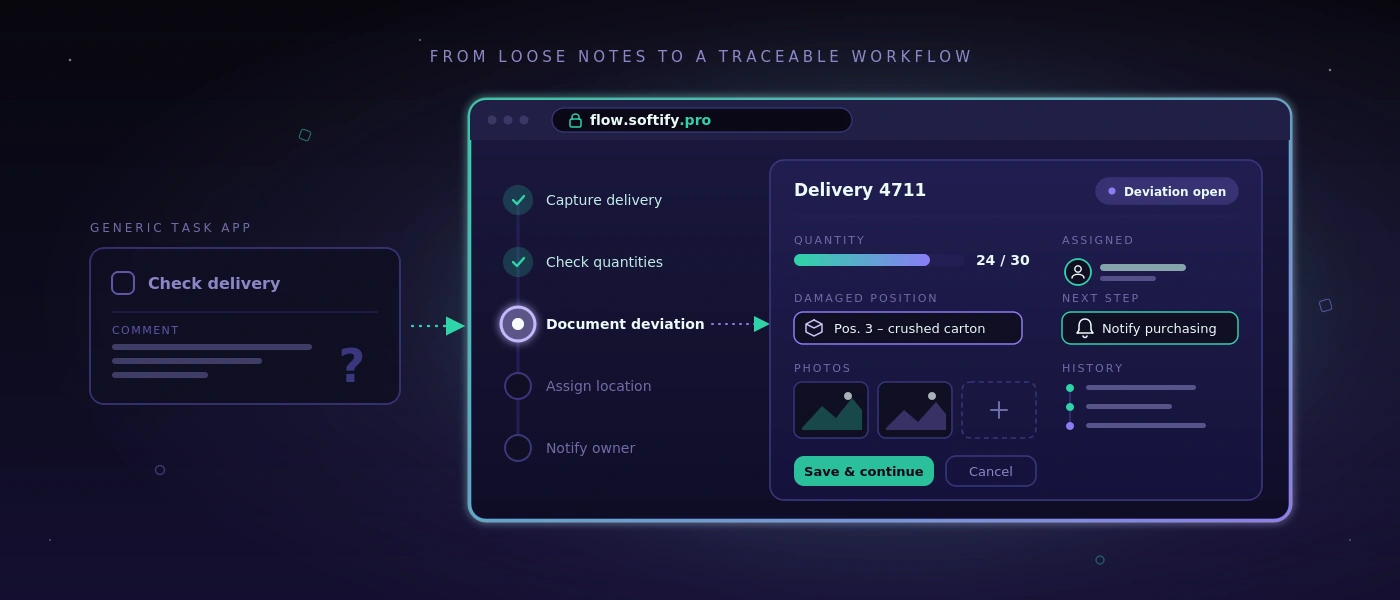
A web workflow is good when employees know without interpretation what to do next. For goods receiving, that can mean: capture the delivery, check quantities against the order, document deviations, assign a storage location, and inform a responsible person if needed. The process doesn't have to be spectacular. It has to be traceable, fast, and repeatable.
This is exactly where the difference lies between a general task app and a business process system. A task app can create an item called “Check delivery.” A business workflow can additionally record which delivery is meant, who accepted it, which item was damaged, which photos exist, and whether a follow-up delivery is outstanding. This data then doesn't sit as free text in a single comment, but where the next person needs it.
For a solution like Flow Web on flow.softify.pro, the evaluation should therefore begin with the transactions, not with a feature list. A business with five warehouse movements a day needs something different from a shipping team with several cut-off times, different carriers, and regular partial-delivery management. SaaS is no substitute for understanding the process.
Name the bottleneck first, then configure
Many digitalization projects start too broad: “We want to digitalize the warehouse.” That sounds plausible but quickly leads to a system with too many screens, special cases, and training documents. A precise statement is better, such as: “Goods receipts are only booked the next day because delivery notes sit on the desk at the end of the shift.”
A sensible start can be derived from such a sentence. The first version can capture delivery notes, confirm items and quantities, flag deviations, and pass the booking on to the responsible office. Once this workflow works, labels, supplier ratings, or automatic order suggestions can be added later. Not every sensible expansion step belongs in the first rollout.
A well-maintained spreadsheet can also stay if it fulfills its purpose. For example, a monthly report with few participants in an existing file can be cheaper and more transparent than a dedicated module. SaaS pays off where information is used several times, processing times are critical, or errors arise from media breaks.
The right questions before introduction
Before configuration, a team should play through a real transaction from start to finish. Not the ideal process, but the case that causes problems in daily work: wrong quantity, missing reference, urgent shipment, or an order with special approval. This reveals the rules a system actually has to represent.
Relevant points include: who may create, change, or close a transaction? Which inputs are mandatory, which merely helpful? When does a manager have to be informed? Which data is passed to accounting, shipping, or customer service? And what happens when the Wi-Fi in the warehouse is weak or an employee no longer has their credentials?
The answers determine the quality of the introduction more strongly than a long catalog of visual requirements. A clean role process, an understandable error message, and a documented approval step usually prevent more effort in operations than an additional report on the home page.
Data storage and roles are not a side issue
SaaS is often treated as purely a question of operation. For operations and IT managers, however, what happens to the data is at least as important. That concerns master data, delivery information, employee data, photos of damage, and possibly customer data. Before introduction, responsibilities, retention, and export options should be clear.
In practice, that means: the company must know which data sits in the system, who has administrative access, and how data is provided in case of a switch or contract termination. An export available only as a hard-to-read PDF file rarely helps. For operational data, structured, usable formats are decisive.
The permission concept also deserves concrete attention. In the warehouse, not every person needs to see prices, customer terms, or global settings. At the same time, overly tight permission assignment must not block the workflow. Roles aligned with actual activities make sense: receiving, dispatch, shipping, team lead, and administration. Critical changes should be traceable, so that nobody has to guess who changed a booking when questions arise.
Access itself should be protected with solid fundamentals. These include secure password policies, a regulated password reset, account lockout after repeated failed attempts, and, where the risk profile demands it, additional login steps. Security comes across as professional when it's predictable and doesn't only become noticeable when someone has been locked out.
Integration only where it measurably relieves effort
A web workflow often only unfolds its value in interplay with existing systems. That can be an ERP, a shop, a shipping solution, a time-tracking tool, or a database. Still, not every interface is automatically sensible. Every integration creates dependencies, failure patterns, and maintenance effort.
The central question is: which manual step does the connection concretely remove? If an interface saves 30 minutes of transfer work a day and reduces typing errors, the benefit is clear. If it merely mirrors information that gets checked once a week anyway, a manual export can initially be the more sensible solution.
With custom extensions, the technical foundation counts. Documented interfaces, clearly defined data fields, and traceable error logs make later operation easier. If a system is connected to a tailor-made web application, technologies and database structure should be chosen so that they remain maintainable in the long term. A well-kept application based on PHP 8.4, modern JavaScript and MySQL 8 is more valuable than a custom solution that's briefly impressive but undocumented.
Introduction during ongoing operations
The most common mistake is a hard start without a comparison phase. Teams are then supposed to work differently immediately on Monday morning, while open questions only arise from real problems. That increases rejection, even if the software fundamentally fits.
Better is a limited pilot with one team, one process variant, or one clearly defined site area. During this time, it's checked whether capture and approvals work, whether terms are understandable, and whether exceptions land cleanly. It's important not to collect feedback merely as a wish list. Every change should be tested against the benefit for lead time, error rate, or transparency.
Metrics should also be defined early. For example, processing time per goods receipt, number of open deviations, queries about delivery status, or correction bookings can be observed. Without a baseline, “feels faster” remains the only assessment. That may be true, but it isn't enough for a robust investment decision.
Operations needs a clear owner
SaaS reduces technical effort, but doesn't relieve a company of responsibility for its own process. Internally, someone is needed who manages roles, bundles feedback, recognizes training needs, and decides which changes are truly necessary. This person doesn't need to be able to program. But they should understand the workflow and have access to the people responsible.
Equally important is brief, robust operating documentation. It doesn't explain every screen, but answers the questions that arise in daily work: what to do about a faulty booking? Who approves new users? How is an outage communicated? Where is exported data stored? Such clarity prevents a digital system from becoming dependent on personal call-outs again after a few months.
A good SaaS solution is therefore not recognized by how many menu items it offers. It shows its value when a new colleague can process a transaction confidently, a deviation doesn't vanish, and a manager sees the status without calling three people. Flow Web should be measured by exactly this standard: not by promises, but by a working day that demonstrably runs calmer and more reliably.